# Manage accounting settings for your business
Use the [Accounting](/docs/api/business) endpoints to create, retrieve, update and delete settings such as accounting categories, tax rates, and labels and label groups.
These accounting settings can be applied to your financial records, such as [expenses](/docs/guides/manage-accounts/accounts-and-transactions/retrieve-expenses), in the Revolut Business app.
```mermaid
flowchart TD
classDef plain fill:none,stroke:none;
subgraph AS [Accounting settings]
direction TD
CRUD[Create, Retrieve, Update, Delete]:::plain
AC[Accounting categories]
TR[Tax rates]
LG[Label groups]
L[Labels]
CRUD --> AC
CRUD --> TR
CRUD --> LG
LG --> L
end
subgraph FR [Financial records]
direction LR
E[Expenses]
B["Labels*
Bills"]
E ~~~ B
end
AS -->|Apply in the app to:| FR
style AS fill:none,stroke-dasharray: 5 5
style FR fill:none,stroke-dasharray: 5 5
```
[Accounting settings](https://business.revolut.com/settings/accounting) let you define your organisation's financial metadata following the structure of your ledger before any financial records are even created.
Pre-configuring these values ensures consistent reporting whether you manage bookkeeping in the Revolut Business app or [sync](https://www.revolut.com/business/integrations/) data to an external platform.
When you create an accounting setting, it becomes immediately available for assignment to financial records such as [expenses](/docs/guides/manage-accounts/accounts-and-transactions/retrieve-expenses) or [bills](https://help.revolut.com/business/help/integrating-with-external-apps/introduction-to-billpay/)*.
You can further automate your workflow by linking default tax rates to specific categories.
This ensures that when a team member categorises an expense, the correct tax logic is applied automatically as the expense moves towards final approval.
The [Business API](/docs/api/business) lets you create, retrieve, update, and delete the following settings:
- [**Accounting categories**](/docs/guides/manage-accounts/accounting/manage-accounting-categories): Define functional buckets, such as `Transportation` or `Office Supplies`, to classify transaction types.
- [**Tax rates**](/docs/guides/manage-accounts/accounting/manage-tax-rates): Establish specific VAT/GST or local tax percentages to ensure compliance across your financial data.
- [**Labels and label groups**](/docs/guides/manage-accounts/accounting/manage-labels-and-label-groups): Add custom tracking dimensions, like `Department` or `Project`, for granular reporting.
:::note [Externally managed settings]
If an accounting software [integration](https://www.revolut.com/business/integrations/) is connected, these settings are typically managed within that external platform.
In this state, the resources are **read-only** via the API, and manual modification attempts will return an error.
:::
::::warning [Deletion consequences for financial records]
Once an accounting setting is deleted, it is removed from the Revolut Business app.
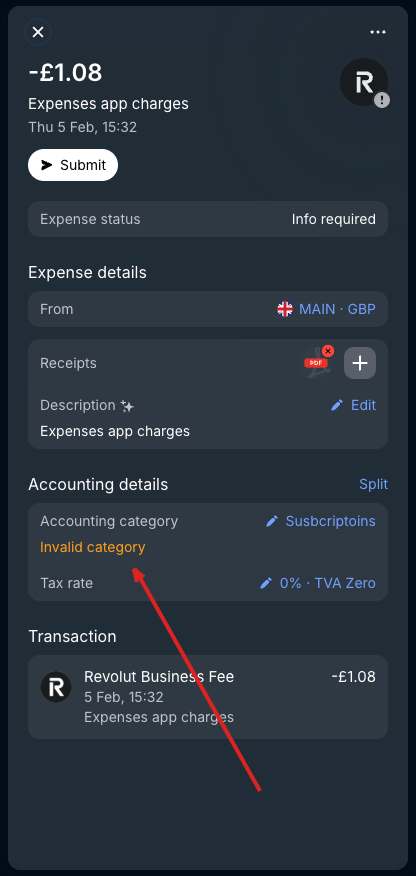
Existing incomplete records with the deleted setting will be marked as **invalid**, and will require a manual update to a valid setting.
Complete records are not affected.
:::details [Example]
Expense with an accounting category that has been deleted:
:::
::::
_*Some settings are not supported for certain types of financial records.
For example, labels cannot be applied to bills.
Check the guides for respective settings for details._